> ## Documentation Index
> Fetch the complete documentation index at: https://mintlify.com/argoproj/argo-cd/llms.txt
> Use this file to discover all available pages before exploring further.
# Sync Waves and Phases
> Control the order of resource deployment using sync waves and phases
Sync waves and phases allow you to control the order in which Argo CD applies resources during a sync operation. This is essential for dependencies like databases before applications, or configuration before deployments.
## Understanding Phases
Argo CD supports multiple sync phases that execute in order:
| Phase | Description |
| ------------ | ------------------------------------------------ |
| `PreSync` | Executes before applying manifests |
| `Sync` | Executes with the main application manifests |
| `Skip` | Skips resource application entirely |
| `PostSync` | Executes after successful sync and health checks |
| `SyncFail` | Executes when sync fails |
| `PreDelete` | Executes before Application deletion |
| `PostDelete` | Executes after Application deletion |
## How Phases Work
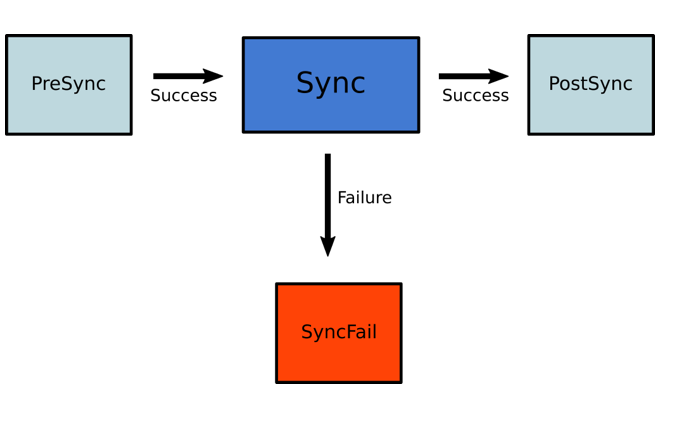
During a sync operation, Argo CD processes phases sequentially:
1. **PreSync hooks** run first. If any fail, sync stops
2. **Sync hooks** and regular resources run. If any fail, SyncFail hooks run
3. **PostSync hooks** run after all resources are healthy
Hooks do not run during selective sync operations.
## Configuring Phases
Assign resources to phases using the hook annotation:
```yaml theme={null}
apiVersion: batch/v1
kind: Job
metadata:
name: db-migration
annotations:
argocd.argoproj.io/hook: PreSync
spec:
template:
spec:
containers:
- name: migrate
image: migrate-tool:latest
command: ["migrate", "up"]
restartPolicy: Never
```
Multiple hooks can be specified as comma-separated: `PreSync,PostSync`
## Understanding Sync Waves
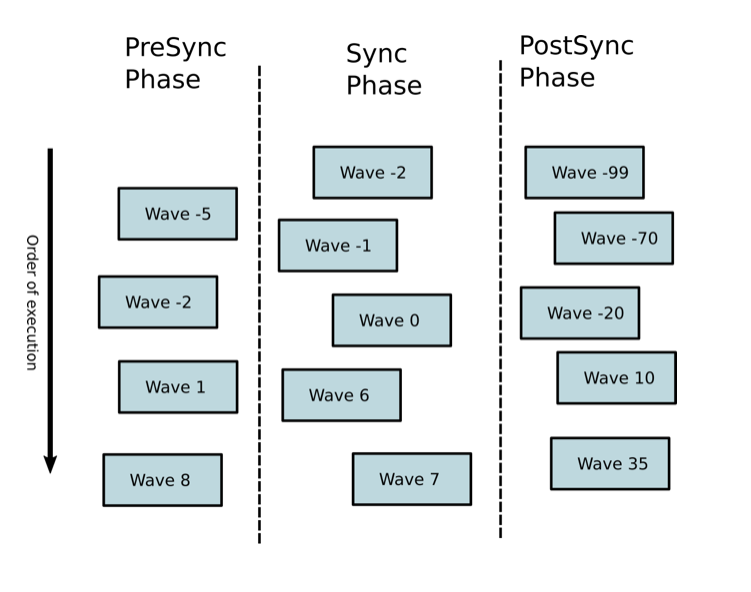
Sync waves provide fine-grained ordering within phases using integer values. Resources are applied from lowest to highest wave number.
**Key concepts:**
* Default wave: `0`
* Waves can be negative (e.g., `-5` runs before `0`)
* 2-second delay between waves (configurable via `ARGOCD_SYNC_WAVE_DELAY`)
* Argo CD waits for each wave to be healthy before proceeding
## Configuring Sync Waves
Use the `argocd.argoproj.io/sync-wave` annotation:
```yaml theme={null}
apiVersion: v1
kind: Namespace
metadata:
name: my-app
annotations:
argocd.argoproj.io/sync-wave: "-5"
---
apiVersion: v1
kind: ConfigMap
metadata:
name: app-config
annotations:
argocd.argoproj.io/sync-wave: "0"
data:
setting: value
---
apiVersion: apps/v1
kind: Deployment
metadata:
name: my-app
annotations:
argocd.argoproj.io/sync-wave: "1"
spec:
replicas: 3
# ... deployment spec
```
## Sync Order Priority
Argo CD determines resource order using this precedence:
1. **Phase** (PreSync → Sync → PostSync)
2. **Wave** (lowest to highest number)
3. **Kind** (Namespaces first, then other resources, then custom resources)
4. **Name** (alphabetical)
## Combining Phases and Waves
Use phases for coarse-grained ordering and waves for precise control:
```yaml theme={null}
# Wave -1: Database migration (PreSync)
apiVersion: batch/v1
kind: Job
metadata:
name: db-migrate
annotations:
argocd.argoproj.io/hook: PreSync
argocd.argoproj.io/sync-wave: "-1"
argocd.argoproj.io/hook-delete-policy: HookSucceeded
spec:
template:
spec:
containers:
- name: migrate
image: postgres:13
command: ["psql", "-f", "migrations.sql"]
restartPolicy: Never
---
# Wave 0: ConfigMaps and Secrets
apiVersion: v1
kind: ConfigMap
metadata:
name: app-config
annotations:
argocd.argoproj.io/sync-wave: "0"
data:
database.url: postgres://db:5432
---
# Wave 1: Deployments
apiVersion: apps/v1
kind: Deployment
metadata:
name: app
annotations:
argocd.argoproj.io/sync-wave: "1"
spec:
replicas: 3
template:
spec:
containers:
- name: app
image: my-app:v1.0.0
---
# Wave 2: Services and Ingress
apiVersion: v1
kind: Service
metadata:
name: app-service
annotations:
argocd.argoproj.io/sync-wave: "2"
spec:
selector:
app: my-app
ports:
- port: 80
```
## Hook Lifecycle Management
Control hook cleanup with delete policies:
```yaml theme={null}
metadata:
annotations:
argocd.argoproj.io/hook: PostSync
argocd.argoproj.io/hook-delete-policy: HookSucceeded
```
| Policy | Description |
| -------------------- | ------------------------------------------------------ |
| `HookSucceeded` | Delete after successful completion |
| `HookFailed` | Delete after failure |
| `BeforeHookCreation` | Delete existing hook before creating new one (default) |
If no delete policy is specified, Argo CD defaults to `BeforeHookCreation`.
## Common Examples
### Database Initialization
Run database setup before application deployment:
```yaml theme={null}
apiVersion: batch/v1
kind: Job
metadata:
name: db-init
annotations:
argocd.argoproj.io/hook: PreSync
argocd.argoproj.io/hook-delete-policy: HookSucceeded
argocd.argoproj.io/sync-wave: "-1"
spec:
ttlSecondsAfterFinished: 360
template:
spec:
containers:
- name: init-db
image: postgres:13
env:
- name: PGPASSWORD
value: admin
command:
- psql
- "-h=postgres-db"
- "-U postgres"
- "-f init.sql"
restartPolicy: Never
backoffLimit: 1
```
### Smoke Tests (PostSync)
Verify deployment health after sync:
```yaml theme={null}
apiVersion: batch/v1
kind: Job
metadata:
name: smoke-test
annotations:
argocd.argoproj.io/hook: PostSync
argocd.argoproj.io/hook-delete-policy: HookSucceeded
spec:
template:
spec:
containers:
- name: test
image: curlimages/curl
command:
- curl
- "--fail"
- "http://my-app/health"
restartPolicy: Never
backoffLimit: 3
```
### Slack Notification
Send notification after successful sync:
```yaml theme={null}
apiVersion: batch/v1
kind: Job
metadata:
generateName: slack-notification-
annotations:
argocd.argoproj.io/hook: PostSync
argocd.argoproj.io/hook-delete-policy: HookSucceeded
spec:
template:
spec:
containers:
- name: notify
image: curlimages/curl
command:
- curl
- "-X"
- POST
- "--data-urlencode"
- >-
payload={"channel": "#deployments", "username": "ArgoCD",
"text": "App sync succeeded", "icon_emoji": ":rocket:"}
- "https://hooks.slack.com/services/YOUR/WEBHOOK/URL"
restartPolicy: Never
backoffLimit: 2
```
### Skip Helm Hook
Prevent Helm-generated hooks from running:
```yaml theme={null}
ingress-nginx:
controller:
admissionWebhooks:
annotations:
argocd.argoproj.io/hook: Skip
```
## PreDelete and PostDelete Hooks
### PreDelete Hook
Run cleanup before application deletion:
```yaml theme={null}
apiVersion: batch/v1
kind: Job
metadata:
name: pre-delete-cleanup
annotations:
argocd.argoproj.io/hook: PreDelete
argocd.argoproj.io/hook-delete-policy: HookSucceeded
spec:
template:
spec:
containers:
- name: cleanup
image: cleanup-tool:latest
command: ["cleanup.sh"]
restartPolicy: Never
```
**Behavior:**
* Runs only during Application deletion (not during normal sync with pruning)
* Application deletion blocks until hooks complete successfully
* If hook fails, Application enters `DeletionError` state
**Failure Handling:**
* Fix the hook in Git; Argo CD retries on next reconciliation
* Or manually delete the failing hook resource to proceed
### PostDelete Hook
Run tasks after all resources are deleted:
```yaml theme={null}
apiVersion: batch/v1
kind: Job
metadata:
name: post-delete-notify
annotations:
argocd.argoproj.io/hook: PostDelete
argocd.argoproj.io/hook-delete-policy: HookSucceeded
spec:
template:
spec:
containers:
- name: notify
image: notification-tool:latest
command: ["send-notification.sh"]
restartPolicy: Never
```
**Behavior:**
* Runs after all Application resources are deleted
* Application CR remains until hooks complete
* Useful for external cleanup, notifications, or audit logs
## Advanced Patterns
### Multi-Tier Application
Deploy infrastructure, then application, then monitoring:
```yaml theme={null}
# Wave -5: Namespace
apiVersion: v1
kind: Namespace
metadata:
name: my-app
annotations:
argocd.argoproj.io/sync-wave: "-5"
---
# Wave -3: Database StatefulSet
apiVersion: apps/v1
kind: StatefulSet
metadata:
name: postgres
annotations:
argocd.argoproj.io/sync-wave: "-3"
spec:
serviceName: postgres
replicas: 3
# ... statefulset spec
---
# Wave -2: Database migration
apiVersion: batch/v1
kind: Job
metadata:
name: db-migrate
annotations:
argocd.argoproj.io/hook: PreSync
argocd.argoproj.io/sync-wave: "-2"
argocd.argoproj.io/hook-delete-policy: HookSucceeded
# ... job spec
---
# Wave 0: Application ConfigMap
apiVersion: v1
kind: ConfigMap
metadata:
name: app-config
annotations:
argocd.argoproj.io/sync-wave: "0"
---
# Wave 1: Application Deployment
apiVersion: apps/v1
kind: Deployment
metadata:
name: app
annotations:
argocd.argoproj.io/sync-wave: "1"
# ... deployment spec
---
# Wave 5: Monitoring ServiceMonitor
apiVersion: monitoring.coreos.com/v1
kind: ServiceMonitor
metadata:
name: app-metrics
annotations:
argocd.argoproj.io/sync-wave: "5"
# ... servicemonitor spec
```
### Blue-Green Deployment
Deploy new version, test, then switch traffic:
```yaml theme={null}
# Wave 1: New (green) deployment
apiVersion: apps/v1
kind: Deployment
metadata:
name: app-green
annotations:
argocd.argoproj.io/sync-wave: "1"
spec:
selector:
matchLabels:
app: my-app
version: green
# ... deployment spec
---
# Wave 2: Test green deployment
apiVersion: batch/v1
kind: Job
metadata:
name: test-green
annotations:
argocd.argoproj.io/hook: PostSync
argocd.argoproj.io/sync-wave: "2"
spec:
# ... test job spec
---
# Wave 3: Switch service to green
apiVersion: v1
kind: Service
metadata:
name: app-service
annotations:
argocd.argoproj.io/sync-wave: "3"
spec:
selector:
app: my-app
version: green
# ... service spec
```
## Troubleshooting
### Resources Not Syncing in Order
1. Verify annotations are correct:
```bash theme={null}
kubectl get -o yaml | grep sync-wave
```
2. Check if resources are in different phases
3. Ensure wave values are strings: `"0"`, not `0`
### Wave Stuck in Progressing
* Check if resources in the wave are healthy
* Review resource events: `kubectl describe `
* Check hook job logs: `kubectl logs job/`
### Sync Too Slow
Reduce wave delay:
```bash theme={null}
# In argocd-application-controller deployment
env:
- name: ARGOCD_SYNC_WAVE_DELAY
value: "1" # 1 second instead of default 2
```
## Best Practices
Reserve negative waves for infrastructure (namespaces, CRDs, databases)
Assign the same wave to resources without dependencies
Test hooks manually before adding to production
Always use delete policies to avoid resource buildup
Be cautious with PreDelete hooks - failed hooks will prevent Application deletion.
## Next Steps
Deep dive into hook types and patterns
Configure sync behavior
Ensure resources are healthy before proceeding
Learn how to create applications