> ## Documentation Index
> Fetch the complete documentation index at: https://mintlify.com/argoproj/argo-cd/llms.txt
> Use this file to discover all available pages before exploring further.
# Architecture
> Understand Argo CD's component-based architecture, how services interact, and deployment patterns for scalability
## Overview
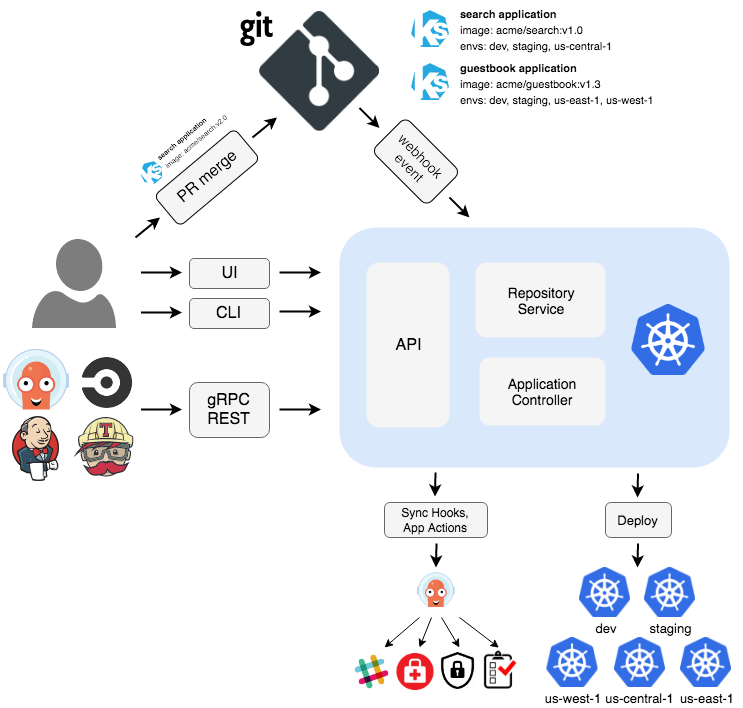
Argo CD is designed with a component-based architecture that separates responsibilities into different deployable units. This design provides modularity, single responsibility, and reusability—enabling you to scale components independently and customize your deployment.
## Core Components
Argo CD consists of several key components that work together to provide continuous delivery capabilities.
### API Server
The API Server is a gRPC/REST server that exposes the API consumed by the Web UI, CLI, and CI/CD systems.
**Responsibilities:**
* Application management and status reporting
* Invoking application operations (sync, rollback, user-defined actions)
* Repository and cluster credential management (stored as Kubernetes secrets)
* Authentication and delegation to external identity providers
* RBAC enforcement
* Listener/forwarder for Git webhook events
**Deployment:**
```yaml theme={null}
apiVersion: apps/v1
kind: Deployment
metadata:
name: argocd-server
namespace: argocd
spec:
selector:
matchLabels:
app.kubernetes.io/name: argocd-server
template:
spec:
serviceAccountName: argocd-server
containers:
- name: argocd-server
image: quay.io/argoproj/argocd:latest
command:
- argocd-server
ports:
- containerPort: 8080 # HTTP
- containerPort: 8083 # gRPC
```
The API Server is stateless and can be horizontally scaled for high availability. See [High Availability](#high-availability) for scaling recommendations.
### Repository Server
The Repository Server is an internal service that maintains a local cache of Git repositories holding application manifests.
**Responsibilities:**
* Generate and return Kubernetes manifests given:
* Repository URL
* Revision (commit, tag, branch)
* Application path
* Template-specific settings (Helm values, Kustomize parameters, etc.)
* Cache repository contents for performance
* Execute configuration management tools (Helm, Kustomize, Jsonnet)
**Input/Output:**
```yaml theme={null}
# Input to Repo Server
repository: https://github.com/argoproj/argocd-example-apps.git
revision: HEAD
path: guestbook
# Output from Repo Server
apiVersion: apps/v1
kind: Deployment
metadata:
name: guestbook-ui
spec:
replicas: 1
# ... (generated Kubernetes manifests)
```
The Repository Server caches repository contents in Redis to minimize Git operations:
* **Repository metadata**: Cached for 3 minutes (default)
* **Manifest generation**: Cached until repository revision changes
* **Helm chart indexes**: Cached for 24 hours (default)
Configure caching behavior in `argocd-cm` ConfigMap:
```yaml theme={null}
apiVersion: v1
kind: ConfigMap
metadata:
name: argocd-cm
data:
timeout.reconciliation: 180s # How often to check for changes
```
### Application Controller
The Application Controller is a Kubernetes controller that continuously monitors running applications and compares the current live state against the desired target state.
**Responsibilities:**
* Monitor applications by comparing live state vs. target state
* Detect `OutOfSync` application state
* Optionally take corrective action (if auto-sync enabled)
* Invoke lifecycle hooks (PreSync, Sync, PostSync)
* Reconcile Application and AppProject resources
**Reconciliation Loop:**
```
┌─────────────────────────────────────────────┐
│ │
│ 1. Fetch target state from Git │
│ (via Repository Server) │
│ │
│ 2. Fetch live state from Kubernetes │
│ (via Kube API) │
│ │
│ 3. Compare states (diff) │
│ │
│ 4. Update Application status │
│ - Sync status │
│ - Health status │
│ │
│ 5. If auto-sync enabled: │
│ Apply changes to cluster │
│ │
└─────────────────────────────────────────────┘
↓
Repeat every 3 minutes (default)
```
The Application Controller watches the Kubernetes API for Application CRD changes. In large deployments with thousands of applications, consider:
* Sharding the controller across multiple instances
* Adjusting the reconciliation timeout
* Using application filters to limit scope
### ApplicationSet Controller
The ApplicationSet Controller automates the generation of Argo CD Applications using templates.
**Responsibilities:**
* Reconcile ApplicationSet resources
* Generate Application resources from templates
* Support multiple generators (Git, Cluster, List, Matrix, etc.)
**Example ApplicationSet:**
```yaml theme={null}
apiVersion: argoproj.io/v1alpha1
kind: ApplicationSet
metadata:
name: guestbook
namespace: argocd
spec:
generators:
- list:
elements:
- cluster: dev
url: https://dev.cluster.local
- cluster: staging
url: https://staging.cluster.local
- cluster: prod
url: https://prod.cluster.local
template:
metadata:
name: '{{cluster}}-guestbook'
spec:
project: default
source:
repoURL: https://github.com/argoproj/argocd-example-apps.git
targetRevision: HEAD
path: guestbook
destination:
server: '{{url}}'
namespace: guestbook
```
This creates three Application resources (dev-guestbook, staging-guestbook, prod-guestbook).
### Redis
Redis provides caching and temporary storage for Argo CD components.
**Use Cases:**
* Cache Git repository contents
* Cache Kubernetes API responses
* Store temporary data for UI operations
* Cache Helm chart indexes
* Store application controller state
**Deployment:**
```yaml theme={null}
apiVersion: apps/v1
kind: Deployment
metadata:
name: argocd-redis
namespace: argocd
spec:
selector:
matchLabels:
app.kubernetes.io/name: argocd-redis
template:
spec:
containers:
- name: redis
image: redis:7.0-alpine
ports:
- containerPort: 6379
```
Redis uses password authentication by default. The password is stored in the `argocd-redis` secret under the `auth` key.
For high availability, consider deploying Redis in HA mode with Redis Sentinel or using a managed Redis service.
### Dex (Optional)
Dex is an identity service that provides authentication with external OIDC providers.
**Supported Providers:**
* LDAP/Active Directory
* SAML 2.0
* GitHub
* GitLab
* Google
* Microsoft
* Okta
* And many more
**Configuration Example:**
```yaml theme={null}
apiVersion: v1
kind: ConfigMap
metadata:
name: argocd-cm
data:
dex.config: |
connectors:
- type: github
id: github
name: GitHub
config:
clientID: $GITHUB_CLIENT_ID
clientSecret: $GITHUB_CLIENT_SECRET
orgs:
- name: my-org
```
Dex is optional. You can use alternative authentication methods:
* Built-in local users
* Direct OIDC integration (bypassing Dex)
* Service accounts for automation
## Component Dependencies
The diagram below shows dependencies between components organized in logical layers:
**Web UI** and **CLI** - Presentation layer for user interaction
Both interact with the API Server
**API Server** - Provides capabilities to support the UI layer
Depends on: Repository Server, Application Controller, Redis, Dex, Kubernetes API
**Application Controller**, **ApplicationSet Controller**, **Repository Server** - Core GitOps functionality
* Application Controller depends on: Repository Server, Kubernetes API, Redis
* Repository Server depends on: Git repositories, Redis
* ApplicationSet Controller depends on: Kubernetes API
**Redis**, **Kubernetes API**, **Git**, **Dex** - Infrastructure dependencies
These are the foundational services that other components depend on
**Dependency Rule**: Components in upper layers can depend on components in lower layers, but components in lower layers never depend on upper layers. This ensures a clean, maintainable architecture.
## Data Flow
### Application Sync Flow
```
┌─────────┐
│ CLI │ or Web UI
└────┬────┘
│ 1. Request sync
↓
┌─────────────┐
│ API Server │
└─────┬───────┘
│ 2. Create sync operation
↓
┌──────────────────────┐
│ Application │
│ Controller │
└─────┬────────────────┘
│ 3. Fetch target state
↓
┌──────────────────────┐
│ Repository Server │ ←─── 4. Clone/pull from Git
└─────┬────────────────┘
│ 5. Return manifests
↓
┌──────────────────────┐
│ Application │
│ Controller │
└─────┬────────────────┘
│ 6. Fetch live state
↓
┌──────────────────────┐
│ Kubernetes API │
└─────┬────────────────┘
│ 7. Return current state
↓
┌──────────────────────┐
│ Application │ ─── 8. Compare & calculate diff
│ Controller │
└─────┬────────────────┘
│ 9. Apply changes (kubectl apply)
↓
┌──────────────────────┐
│ Kubernetes API │
└──────────────────────┘
```
## High Availability
For production deployments, Argo CD supports high availability configurations.
### HA Deployment Architecture
**Scalable Components:**
* **API Server**: Multiple replicas (3+ recommended)
* **Repository Server**: Multiple replicas (3+ recommended)
* **Application Controller**: Active-passive with leader election
* **ApplicationSet Controller**: Active-passive with leader election
* **Redis**: HA mode with Sentinel (3+ instances recommended)
**Installation:**
```bash theme={null}
kubectl create namespace argocd
kubectl apply -n argocd -f https://raw.githubusercontent.com/argoproj/argo-cd/stable/manifests/ha/install.yaml
```
### Sharding the Application Controller
For deployments with thousands of applications, shard the Application Controller:
```yaml theme={null}
apiVersion: apps/v1
kind: StatefulSet
metadata:
name: argocd-application-controller
spec:
replicas: 3
template:
spec:
containers:
- name: argocd-application-controller
env:
- name: ARGOCD_CONTROLLER_REPLICAS
value: "3"
- name: ARGOCD_CONTROLLER_SHARD
valueFrom:
fieldRef:
fieldPath: metadata.name
```
Applications are distributed across shards using consistent hashing.
Argo CD uses the application name to determine which shard manages it:
```
shard = hash(applicationName) % ARGOCD_CONTROLLER_REPLICAS
```
This ensures:
* Even distribution of applications across shards
* Each application is managed by exactly one shard
* Minimal resharding when scaling up/down
## Deployment Patterns
### Standard Installation
**Use case**: Development, testing, small-scale production
```bash theme={null}
kubectl create namespace argocd
kubectl apply -n argocd -f https://raw.githubusercontent.com/argoproj/argo-cd/stable/manifests/install.yaml
```
**Components:**
* 1 API Server replica
* 1 Repository Server replica
* 1 Application Controller
* 1 Redis instance
* 1 Dex instance
### Namespace-Scoped Installation
**Use case**: Multi-tenant clusters, limited permissions
```bash theme={null}
kubectl create namespace argocd
kubectl apply -n argocd -f https://raw.githubusercontent.com/argoproj/argo-cd/stable/manifests/namespace-install.yaml
```
Limits Argo CD to managing resources only in the namespace where it's installed.
### Core Installation
**Use case**: Lightweight deployments, no UI/SSO required
```bash theme={null}
kubectl create namespace argocd
kubectl apply -n argocd -f https://raw.githubusercontent.com/argoproj/argo-cd/stable/manifests/core-install.yaml
```
**Omits:**
* API Server
* Dex
* Web UI
Access via CLI only using `argocd login --core`.
### High Availability Installation
**Use case**: Production deployments, mission-critical applications
```bash theme={null}
kubectl create namespace argocd
kubectl apply -n argocd -f https://raw.githubusercontent.com/argoproj/argo-cd/stable/manifests/ha/install.yaml
```
**Components:**
* 3 API Server replicas
* 3 Repository Server replicas
* 1 Application Controller (with leader election)
* 3 Redis instances (HA mode with Sentinel)
* 3 Dex replicas
## Security Considerations
**Principle of Least Privilege**
Argo CD requires significant permissions to manage cluster resources. Follow these security best practices:
1. **Use Projects** to limit which repositories and clusters teams can access
2. **Configure RBAC** to restrict user permissions
3. **Enable SSO** with your identity provider
4. **Rotate credentials** stored in secrets regularly
5. **Use separate clusters** for Argo CD and applications when possible
6. **Enable audit logging** to track changes
Restrict network traffic between components:
```yaml theme={null}
apiVersion: networking.k8s.io/v1
kind: NetworkPolicy
metadata:
name: argocd-application-controller
namespace: argocd
spec:
podSelector:
matchLabels:
app.kubernetes.io/name: argocd-application-controller
policyTypes:
- Ingress
- Egress
ingress:
- from:
- podSelector:
matchLabels:
app.kubernetes.io/name: argocd-server
ports:
- protocol: TCP
port: 8082
egress:
- to:
- podSelector:
matchLabels:
app.kubernetes.io/name: argocd-repo-server
ports:
- protocol: TCP
port: 8081
- to:
- namespaceSelector: {}
ports:
- protocol: TCP
port: 443 # Kubernetes API
```
## Monitoring and Observability
### Metrics
Argo CD exposes Prometheus metrics on each component:
* **API Server**: `:8083/metrics`
* **Repository Server**: `:8084/metrics`
* **Application Controller**: `:8082/metrics`
**Key Metrics:**
```
# Application sync status
argocd_app_sync_total
argocd_app_sync_status
# Repository operations
argocd_git_request_total
argocd_git_request_duration_seconds
# Controller performance
argocd_app_reconcile_count
argocd_app_reconcile_bucket
# API requests
argocd_api_request_total
argocd_api_request_duration_seconds
```
### Health Checks
Each component exposes health endpoints:
```bash theme={null}
# API Server health
curl http://argocd-server:8080/healthz
# Repository Server health
curl http://argocd-repo-server:8081/healthz
# Application Controller health
curl http://argocd-application-controller:8082/healthz
```
## Next Steps
Configure Argo CD for production with HA
Set up monitoring with Prometheus and Grafana
Plan for backup and recovery scenarios
Configure SSO and RBAC for your team