Understanding Phases
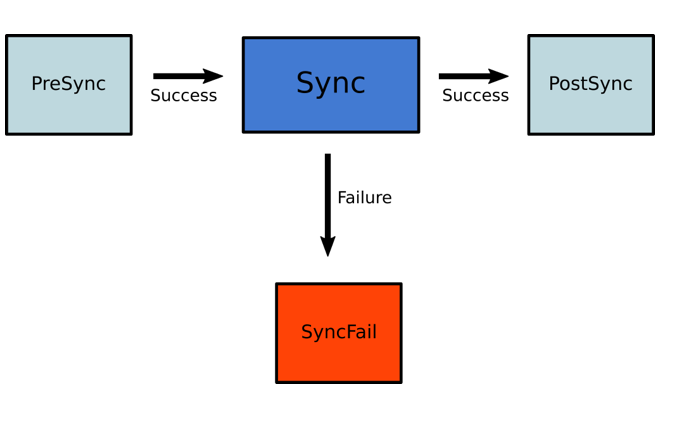
Argo CD supports multiple sync phases that execute in order:How Phases Work
During a sync operation, Argo CD processes phases sequentially:- PreSync hooks run first. If any fail, sync stops
- Sync hooks and regular resources run. If any fail, SyncFail hooks run
- PostSync hooks run after all resources are healthy
Hooks do not run during selective sync operations.
Configuring Phases
Assign resources to phases using the hook annotation:Multiple hooks can be specified as comma-separated:
PreSync,PostSyncUnderstanding Sync Waves
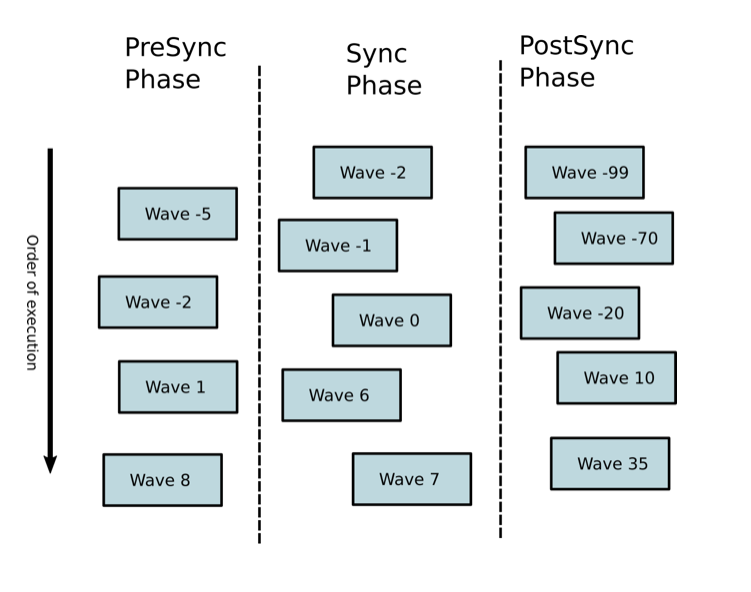
Sync waves provide fine-grained ordering within phases using integer values. Resources are applied from lowest to highest wave number. Key concepts:- Default wave:
0 - Waves can be negative (e.g.,
-5runs before0) - 2-second delay between waves (configurable via
ARGOCD_SYNC_WAVE_DELAY) - Argo CD waits for each wave to be healthy before proceeding
Configuring Sync Waves
Use theargocd.argoproj.io/sync-wave annotation:
Sync Order Priority
Argo CD determines resource order using this precedence:- Phase (PreSync → Sync → PostSync)
- Wave (lowest to highest number)
- Kind (Namespaces first, then other resources, then custom resources)
- Name (alphabetical)
Combining Phases and Waves
Use phases for coarse-grained ordering and waves for precise control:Hook Lifecycle Management
Control hook cleanup with delete policies:If no delete policy is specified, Argo CD defaults to
BeforeHookCreation.Common Examples
Database Initialization
Run database setup before application deployment:Smoke Tests (PostSync)
Verify deployment health after sync:Slack Notification
Send notification after successful sync:Skip Helm Hook
Prevent Helm-generated hooks from running:PreDelete and PostDelete Hooks
PreDelete Hook
Run cleanup before application deletion:- Runs only during Application deletion (not during normal sync with pruning)
- Application deletion blocks until hooks complete successfully
- If hook fails, Application enters
DeletionErrorstate
- Fix the hook in Git; Argo CD retries on next reconciliation
- Or manually delete the failing hook resource to proceed
PostDelete Hook
Run tasks after all resources are deleted:- Runs after all Application resources are deleted
- Application CR remains until hooks complete
- Useful for external cleanup, notifications, or audit logs
Advanced Patterns
Multi-Tier Application
Deploy infrastructure, then application, then monitoring:Blue-Green Deployment
Deploy new version, test, then switch traffic:Troubleshooting
Resources Not Syncing in Order
-
Verify annotations are correct:
- Check if resources are in different phases
-
Ensure wave values are strings:
"0", not0
Wave Stuck in Progressing
- Check if resources in the wave are healthy
- Review resource events:
kubectl describe <resource> - Check hook job logs:
kubectl logs job/<job-name>
Sync Too Slow
Reduce wave delay:Best Practices
Use Negative Waves
Reserve negative waves for infrastructure (namespaces, CRDs, databases)
Group by Dependency
Assign the same wave to resources without dependencies
Test Hooks Separately
Test hooks manually before adding to production
Clean Up Hooks
Always use delete policies to avoid resource buildup
Next Steps
Resource Hooks
Deep dive into hook types and patterns
Sync Options
Configure sync behavior
Health Checks
Ensure resources are healthy before proceeding
Creating Apps
Learn how to create applications