
Overview

Argo CD is designed with a component-based architecture that separates responsibilities into different deployable units. This design provides modularity, single responsibility, and reusability—enabling you to scale components independently and customize your deployment. Argo CD Architecture
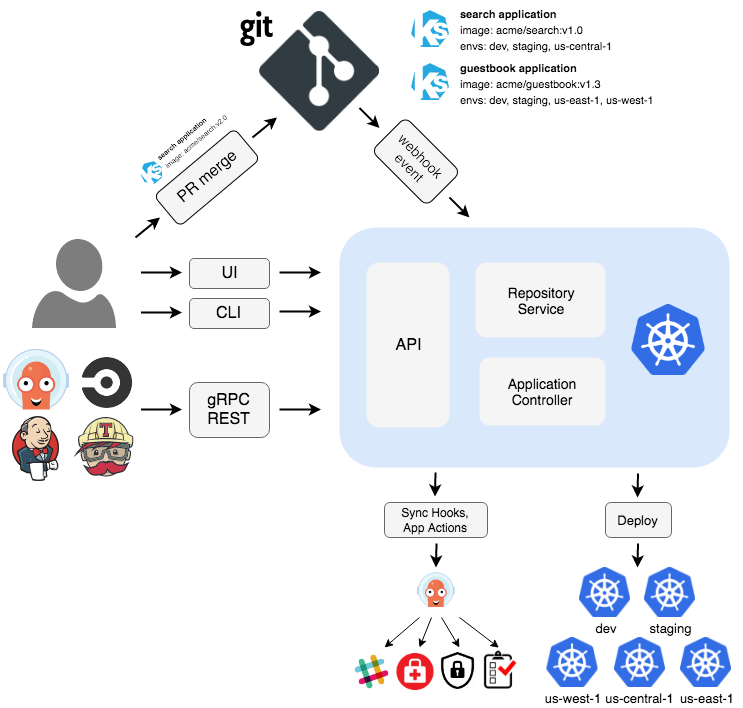
Core Components

Argo CD consists of several key components that work together to provide continuous delivery capabilities.

API Server

The API Server is a gRPC/REST server that exposes the API consumed by the Web UI, CLI, and CI/CD systems. Responsibilities:
  • Application management and status reporting
  • Invoking application operations (sync, rollback, user-defined actions)
  • Repository and cluster credential management (stored as Kubernetes secrets)
  • Authentication and delegation to external identity providers
  • RBAC enforcement
  • Listener/forwarder for Git webhook events
Deployment:
apiVersion: apps/v1
kind: Deployment
metadata:
  name: argocd-server
  namespace: argocd
spec:
  selector:
    matchLabels:
      app.kubernetes.io/name: argocd-server
  template:
    spec:
      serviceAccountName: argocd-server
      containers:
      - name: argocd-server
        image: quay.io/argoproj/argocd:latest
        command:
        - argocd-server
        ports:
        - containerPort: 8080  # HTTP
        - containerPort: 8083  # gRPC
The API Server is stateless and can be horizontally scaled for high availability. See High Availability for scaling recommendations.

Repository Server

The Repository Server is an internal service that maintains a local cache of Git repositories holding application manifests. Responsibilities:
  • Generate and return Kubernetes manifests given:
    • Repository URL
    • Revision (commit, tag, branch)
    • Application path
    • Template-specific settings (Helm values, Kustomize parameters, etc.)
  • Cache repository contents for performance
  • Execute configuration management tools (Helm, Kustomize, Jsonnet)
Input/Output:
# Input to Repo Server
repository: https://github.com/argoproj/argocd-example-apps.git
revision: HEAD
path: guestbook

# Output from Repo Server
apiVersion: apps/v1
kind: Deployment
metadata:
  name: guestbook-ui
spec:
  replicas: 1
  # ... (generated Kubernetes manifests)
The Repository Server caches repository contents in Redis to minimize Git operations:
  • Repository metadata: Cached for 3 minutes (default)
  • Manifest generation: Cached until repository revision changes
  • Helm chart indexes: Cached for 24 hours (default)
Configure caching behavior in argocd-cm ConfigMap:
apiVersion: v1
kind: ConfigMap
metadata:
  name: argocd-cm
data:
  timeout.reconciliation: 180s  # How often to check for changes

Application Controller

The Application Controller is a Kubernetes controller that continuously monitors running applications and compares the current live state against the desired target state. Responsibilities:
  • Monitor applications by comparing live state vs. target state
  • Detect OutOfSync application state
  • Optionally take corrective action (if auto-sync enabled)
  • Invoke lifecycle hooks (PreSync, Sync, PostSync)
  • Reconcile Application and AppProject resources
Reconciliation Loop:
┌─────────────────────────────────────────────┐
│                                             │
│  1. Fetch target state from Git            │
│     (via Repository Server)                 │
│                                             │
│  2. Fetch live state from Kubernetes        │
│     (via Kube API)                          │
│                                             │
│  3. Compare states (diff)                   │
│                                             │
│  4. Update Application status               │
│     - Sync status                           │
│     - Health status                         │
│                                             │
│  5. If auto-sync enabled:                   │
│     Apply changes to cluster                │
│                                             │
└─────────────────────────────────────────────┘

    Repeat every 3 minutes (default)
The Application Controller watches the Kubernetes API for Application CRD changes. In large deployments with thousands of applications, consider:
  • Sharding the controller across multiple instances
  • Adjusting the reconciliation timeout
  • Using application filters to limit scope

ApplicationSet Controller

The ApplicationSet Controller automates the generation of Argo CD Applications using templates. Responsibilities:
  • Reconcile ApplicationSet resources
  • Generate Application resources from templates
  • Support multiple generators (Git, Cluster, List, Matrix, etc.)
Example ApplicationSet:
apiVersion: argoproj.io/v1alpha1
kind: ApplicationSet
metadata:
  name: guestbook
  namespace: argocd
spec:
  generators:
  - list:
      elements:
      - cluster: dev
        url: https://dev.cluster.local
      - cluster: staging
        url: https://staging.cluster.local
      - cluster: prod
        url: https://prod.cluster.local
  template:
    metadata:
      name: '{{cluster}}-guestbook'
    spec:
      project: default
      source:
        repoURL: https://github.com/argoproj/argocd-example-apps.git
        targetRevision: HEAD
        path: guestbook
      destination:
        server: '{{url}}'
        namespace: guestbook
This creates three Application resources (dev-guestbook, staging-guestbook, prod-guestbook).

Redis

Redis provides caching and temporary storage for Argo CD components. Use Cases:
  • Cache Git repository contents
  • Cache Kubernetes API responses
  • Store temporary data for UI operations
  • Cache Helm chart indexes
  • Store application controller state
Deployment:
apiVersion: apps/v1
kind: Deployment
metadata:
  name: argocd-redis
  namespace: argocd
spec:
  selector:
    matchLabels:
      app.kubernetes.io/name: argocd-redis
  template:
    spec:
      containers:
      - name: redis
        image: redis:7.0-alpine
        ports:
        - containerPort: 6379
Redis uses password authentication by default. The password is stored in the argocd-redis secret under the auth key.For high availability, consider deploying Redis in HA mode with Redis Sentinel or using a managed Redis service.

Dex (Optional)

Dex is an identity service that provides authentication with external OIDC providers. Supported Providers:
  • LDAP/Active Directory
  • SAML 2.0
  • GitHub
  • GitLab
  • Google
  • Microsoft
  • Okta
  • And many more
Configuration Example:
apiVersion: v1
kind: ConfigMap
metadata:
  name: argocd-cm
data:
  dex.config: |
    connectors:
    - type: github
      id: github
      name: GitHub
      config:
        clientID: $GITHUB_CLIENT_ID
        clientSecret: $GITHUB_CLIENT_SECRET
        orgs:
        - name: my-org
Dex is optional. You can use alternative authentication methods:
  • Built-in local users
  • Direct OIDC integration (bypassing Dex)
  • Service accounts for automation

Component Dependencies

The diagram below shows dependencies between components organized in logical layers:
1

UI Layer

Web UI and CLI - Presentation layer for user interactionBoth interact with the API Server
2

Application Layer

API Server - Provides capabilities to support the UI layerDepends on: Repository Server, Application Controller, Redis, Dex, Kubernetes API
3

Core Layer

Application Controller, ApplicationSet Controller, Repository Server - Core GitOps functionality
  • Application Controller depends on: Repository Server, Kubernetes API, Redis
  • Repository Server depends on: Git repositories, Redis
  • ApplicationSet Controller depends on: Kubernetes API
4

Infrastructure Layer

Redis, Kubernetes API, Git, Dex - Infrastructure dependenciesThese are the foundational services that other components depend on
Dependency Rule: Components in upper layers can depend on components in lower layers, but components in lower layers never depend on upper layers. This ensures a clean, maintainable architecture.

Data Flow

Application Sync Flow

┌─────────┐
│   CLI   │ or Web UI
└────┬────┘
     │ 1. Request sync

┌─────────────┐
│ API Server  │
└─────┬───────┘
      │ 2. Create sync operation

┌──────────────────────┐
│ Application          │
│ Controller           │
└─────┬────────────────┘
      │ 3. Fetch target state

┌──────────────────────┐
│ Repository Server    │ ←─── 4. Clone/pull from Git
└─────┬────────────────┘
      │ 5. Return manifests

┌──────────────────────┐
│ Application          │
│ Controller           │
└─────┬────────────────┘
      │ 6. Fetch live state

┌──────────────────────┐
│ Kubernetes API       │
└─────┬────────────────┘
      │ 7. Return current state

┌──────────────────────┐
│ Application          │ ─── 8. Compare & calculate diff
│ Controller           │
└─────┬────────────────┘
      │ 9. Apply changes (kubectl apply)

┌──────────────────────┐
│ Kubernetes API       │
└──────────────────────┘

High Availability

For production deployments, Argo CD supports high availability configurations.

HA Deployment Architecture

Scalable Components:
  • API Server: Multiple replicas (3+ recommended)
  • Repository Server: Multiple replicas (3+ recommended)
  • Application Controller: Active-passive with leader election
  • ApplicationSet Controller: Active-passive with leader election
  • Redis: HA mode with Sentinel (3+ instances recommended)
Installation:
kubectl create namespace argocd
kubectl apply -n argocd -f https://raw.githubusercontent.com/argoproj/argo-cd/stable/manifests/ha/install.yaml

Sharding the Application Controller

For deployments with thousands of applications, shard the Application Controller:
apiVersion: apps/v1
kind: StatefulSet
metadata:
  name: argocd-application-controller
spec:
  replicas: 3
  template:
    spec:
      containers:
      - name: argocd-application-controller
        env:
        - name: ARGOCD_CONTROLLER_REPLICAS
          value: "3"
        - name: ARGOCD_CONTROLLER_SHARD
          valueFrom:
            fieldRef:
              fieldPath: metadata.name
Applications are distributed across shards using consistent hashing.
Argo CD uses the application name to determine which shard manages it:
shard = hash(applicationName) % ARGOCD_CONTROLLER_REPLICAS
This ensures:
  • Even distribution of applications across shards
  • Each application is managed by exactly one shard
  • Minimal resharding when scaling up/down

Deployment Patterns

Standard Installation

Use case: Development, testing, small-scale production
kubectl create namespace argocd
kubectl apply -n argocd -f https://raw.githubusercontent.com/argoproj/argo-cd/stable/manifests/install.yaml
Components:
  • 1 API Server replica
  • 1 Repository Server replica
  • 1 Application Controller
  • 1 Redis instance
  • 1 Dex instance

Namespace-Scoped Installation

Use case: Multi-tenant clusters, limited permissions
kubectl create namespace argocd
kubectl apply -n argocd -f https://raw.githubusercontent.com/argoproj/argo-cd/stable/manifests/namespace-install.yaml
Limits Argo CD to managing resources only in the namespace where it’s installed.

Core Installation

Use case: Lightweight deployments, no UI/SSO required
kubectl create namespace argocd
kubectl apply -n argocd -f https://raw.githubusercontent.com/argoproj/argo-cd/stable/manifests/core-install.yaml
Omits:
  • API Server
  • Dex
  • Web UI
Access via CLI only using argocd login --core.

High Availability Installation

Use case: Production deployments, mission-critical applications
kubectl create namespace argocd
kubectl apply -n argocd -f https://raw.githubusercontent.com/argoproj/argo-cd/stable/manifests/ha/install.yaml
Components:
  • 3 API Server replicas
  • 3 Repository Server replicas
  • 1 Application Controller (with leader election)
  • 3 Redis instances (HA mode with Sentinel)
  • 3 Dex replicas

Security Considerations

Principle of Least PrivilegeArgo CD requires significant permissions to manage cluster resources. Follow these security best practices:
  1. Use Projects to limit which repositories and clusters teams can access
  2. Configure RBAC to restrict user permissions
  3. Enable SSO with your identity provider
  4. Rotate credentials stored in secrets regularly
  5. Use separate clusters for Argo CD and applications when possible
  6. Enable audit logging to track changes
Restrict network traffic between components:
apiVersion: networking.k8s.io/v1
kind: NetworkPolicy
metadata:
  name: argocd-application-controller
  namespace: argocd
spec:
  podSelector:
    matchLabels:
      app.kubernetes.io/name: argocd-application-controller
  policyTypes:
  - Ingress
  - Egress
  ingress:
  - from:
    - podSelector:
        matchLabels:
          app.kubernetes.io/name: argocd-server
    ports:
    - protocol: TCP
      port: 8082
  egress:
  - to:
    - podSelector:
        matchLabels:
          app.kubernetes.io/name: argocd-repo-server
    ports:
    - protocol: TCP
      port: 8081
  - to:
    - namespaceSelector: {}
    ports:
    - protocol: TCP
      port: 443  # Kubernetes API

Monitoring and Observability

Metrics

Argo CD exposes Prometheus metrics on each component:
  • API Server: :8083/metrics
  • Repository Server: :8084/metrics
  • Application Controller: :8082/metrics
Key Metrics:
# Application sync status
argocd_app_sync_total
argocd_app_sync_status

# Repository operations
argocd_git_request_total
argocd_git_request_duration_seconds

# Controller performance
argocd_app_reconcile_count
argocd_app_reconcile_bucket

# API requests
argocd_api_request_total
argocd_api_request_duration_seconds

Health Checks

Each component exposes health endpoints:
# API Server health
curl http://argocd-server:8080/healthz

# Repository Server health
curl http://argocd-repo-server:8081/healthz

# Application Controller health
curl http://argocd-application-controller:8082/healthz

Next Steps

High Availability

Configure Argo CD for production with HA

Metrics & Monitoring

Set up monitoring with Prometheus and Grafana

Disaster Recovery

Plan for backup and recovery scenarios

User Management

Configure SSO and RBAC for your team